Open Office Find Replace
Powerful batch find and replace tool for OpenOffice and LibreOffice documents. Search and replace text, formatting, and images across hundreds of files simultaneously.
Free trial available - No credit card required
Supported File Formats
Works with all major Open Office Document file types from LibreOffice and Apache
Writer Documents (.odt)
Full support for OpenDocument Text files from LibreOffice Writer and OpenOffice Writer
Spreadsheets (.ods)
Search and replace text and images in Calc spreadsheets, including cell content and formulas
Presentations (.odp)
Process Impress presentations with text and Image replacement across all slides
Powerful Text Find & Replace
Advanced text searching with flexible matching options
Advanced Pattern Matching
Full regular expression (regex) support for complex pattern matching. Find phone numbers, emails, dates, or any custom pattern across your documents.
Smart Case Handling
Case-sensitive and case-insensitive search options. "Follow Case" feature preserves original capitalization patterns when replacing text.
Formatting-Based Search
Find and replace based on text formatting and styles
Color-Based Search
Find text by font color or highlight color. Perfect for updating color-coded content.
Style Matching
Search for bold, italic, underline, or strikethrough text. Match or exclude specific styles.
Apply New Formatting
Replace text and apply new formatting in a single operation. Change colors, styles, and more.
Document Section Targeting
Control exactly where your search and replace operations run
Search Specific Areas
Target your search to specific document areas: body text, headers and footers, hyperlinks, or notes and comments. Process only the sections you need.
Spreadsheet Formulas
Search and replace within Calc spreadsheet formulas. Update cell references, function names, or values across entire workbooks.
Image Operations
Powerful image management across your documents
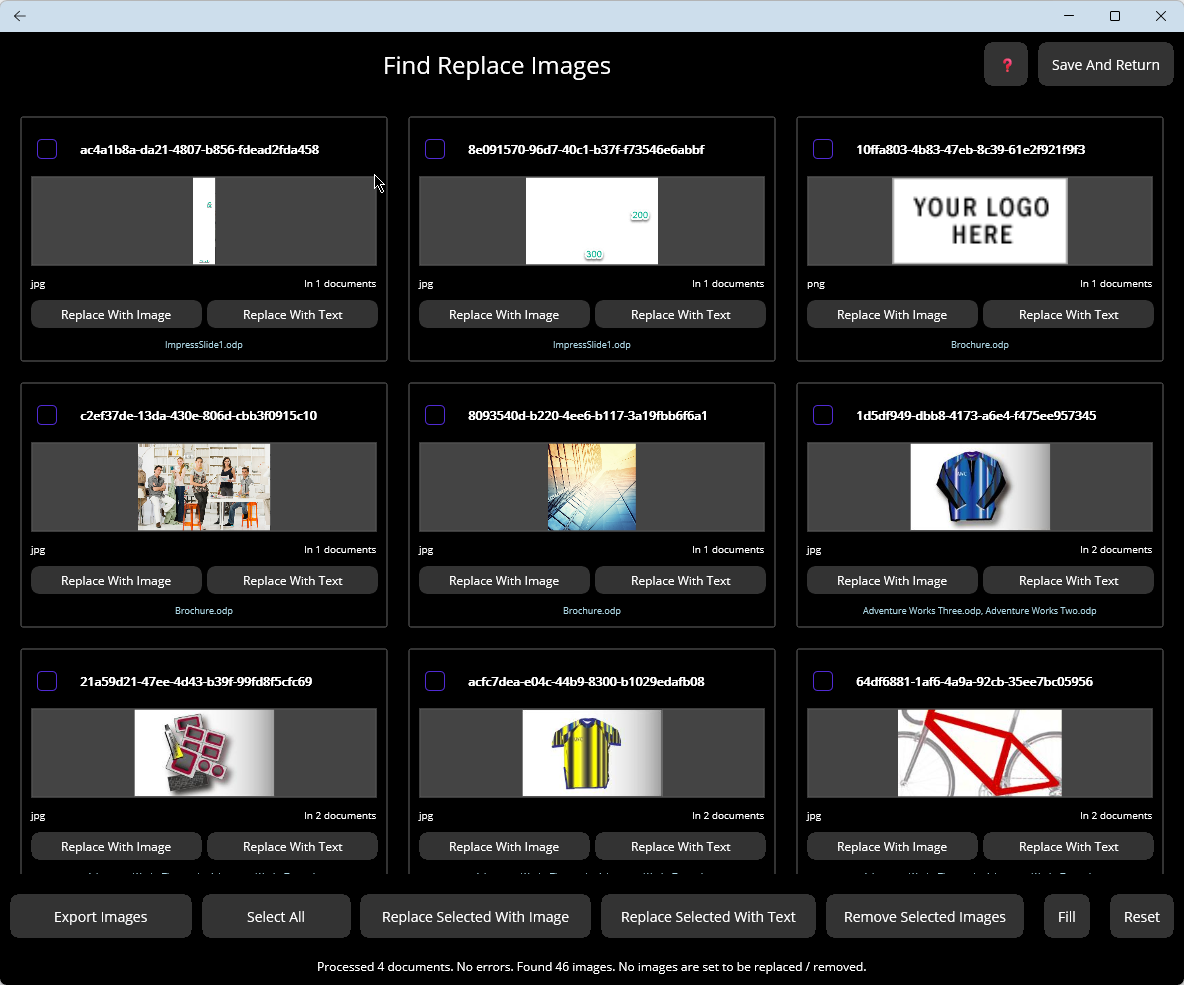
Find & Replace Images
Locate all images across selected documents with visual preview. Replace outdated logos, diagrams, or photos with new versions in bulk.
Extract & Export
Extract all images from documents to a folder. Perfect for archiving, reviewing, or reusing graphics from existing files.
Batch Processing
Process hundreds of documents in a single operation
Folder Processing
Process entire folders of documents at once. Recursive subfolder searching included.
Drag-and-Drop
Simply drag files and folders into the application. No complex file selection dialogs.
File Review
Review and filter selected files before processing. Remove unwanted files from the list.
Structure Preservation
Preserve original folder structure in output. Keep your files organized.
Bulk Operations
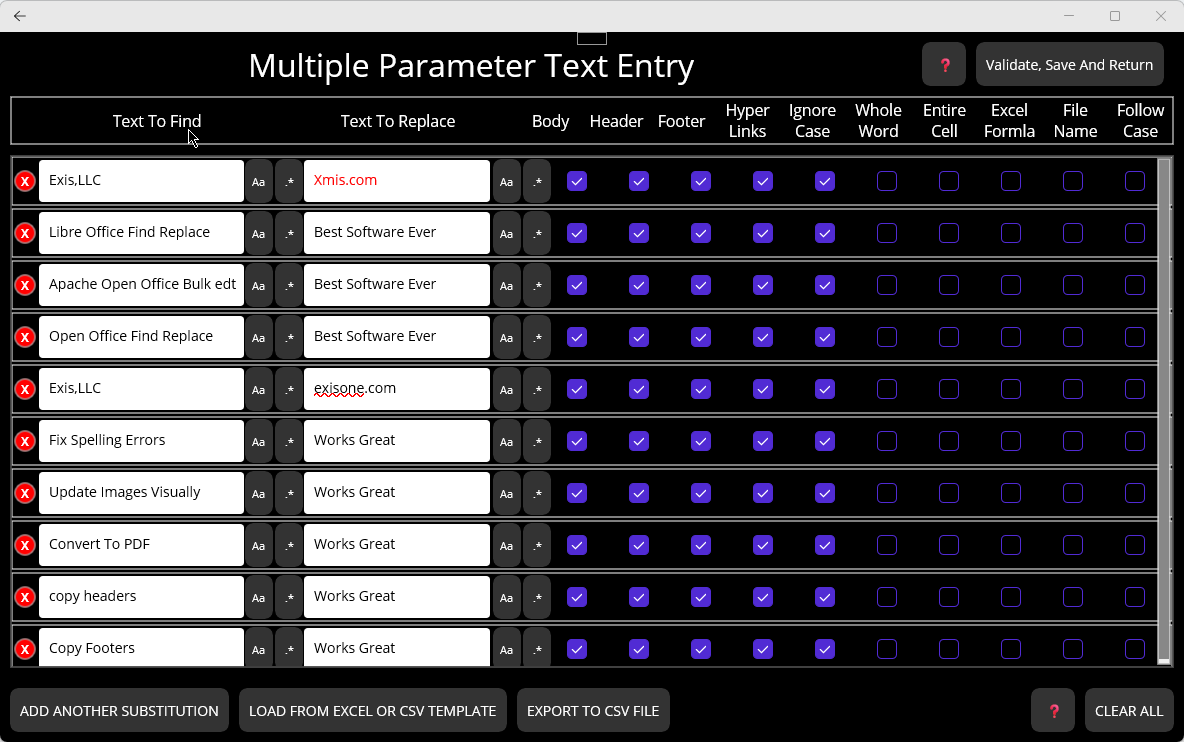
Define multiple substitutions and reuse them across projects
Import from Excel/CSV
Import find/replace parameters from Excel or CSV templates. Define hundreds of substitutions easily.
Export Substitutions
Export your substitution list to CSV for reuse. Share configurations with team members.
Session Persistence
Save and restore application state between sessions. Pick up right where you left off.
Flexible Output Options
Control how and where your processed files are saved
Save Options
Save processed files to a new destination folder or overwrite originals in place. Your choice for every operation.
Bulk PDF Conversion
Convert hundreds of ODT, ODS, and ODP documents to PDF in a single batch operation. Process entire folders and preserve directory structure while creating distribution-ready PDF files.
Simple Step-by-Step Workflow
Intuitive interface guides you through every operation
Select Files
Drag and drop files or folders, or browse to select. Review your file list before proceeding.
Define Rules
Set up your find/replace rules with text, formatting, or import from Excel/CSV template.
Process
Click to process all files. Watch real-time progress and review detailed logs when complete.
100% Offline Processing
Your documents never leave your computer. All processing happens locally - no internet connection required, no cloud uploads, no external servers.
Perfect For These Tasks
Common use cases where Open Office Find Replace saves hours of work
Company Rebranding
Update company names, logos, and branding across thousands of documents in minutes instead of days.
Legal Document Updates
Replace outdated terms, update party names, or revise standard clauses across contract templates.
Template Standardization
Ensure consistent formatting, terminology, and styling across all documents in your organization.
Data Migration
Update file paths, server names, URLs, or other references when migrating to new systems.
Bulk PDF Generation
Convert entire folders of OpenOffice documents to PDF for distribution, archiving, or publishing - all in one batch operation.
Simple Licensing
- Annual subscription - Billed yearly, cancel anytime
- Free updates - All updates included while subscribed
- Use on one computer - License tied to your machine
- No internet required - Works completely offline after activation
- 14-day free trial - Try before you buy
Full Version
- All features included
- ODT, ODS, ODP support
- Unlimited batch processing
- Bulk PDF conversion
- Image operations
- Free updates while subscribed
- Email support
Technical Details
System Requirements
- Windows 10 or later
- macOS 10.14 or later
- 64-bit processor
- 100 MB disk space
Supported Formats
- OpenDocument Text (.odt)
- OpenDocument Spreadsheet (.ods)
- OpenDocument Presentation (.odp)
- PDF export output
Compatibility
- LibreOffice 6.0+
- OpenOffice 4.0+
- Any ODF-compliant application
- Microsoft 365 (via export)
Related Articles
Background and how-to guides on batch find and replace in LibreOffice and OpenOffice documents
Why OpenOffice Find & Replace Doesn't Work Across Multiple Files
Why LibreOffice and OpenOffice's built-in Find & Replace is file-scoped by design, the workarounds people try (manual, plain text, raw XML, macros), and what a real cross-file solution looks like.
Read article →How to Batch Find and Replace in LibreOffice and OpenOffice Documents
A method-by-method comparison of every approach — built-in Find & Replace, AltSearch, LibreOffice macros, Python odfpy, manual XML, Sobolsoft, PowerGREP, and dedicated batch tools — with honest tradeoffs.
Ready to Save Hours of Manual Work?
Download the free trial and see how much time you can save.