UFF Converter Pro
Convert UFF files to Excel & CSV with one click. Professional-grade Universal File Format converter with built-in Bode and Nyquist charts for modal analysis, vibration testing, and acoustic measurements. Export FRF data from LMS, Simcenter, and other test systems with full metadata preservation. Streaming engine handles million+ row datasets. 100% local processing ensures your proprietary test data never leaves your machine.
14-day free trial - No credit card required
Comprehensive File Format Support
Read and convert virtually any UFF file from your test and measurement systems
ASCII UFF Files
Full support for standard ASCII Universal File Format Type 58 files from any vendor
Binary UFF Files
Native support for binary 58b format - faster processing and smaller file sizes
Multiple Record Types
Handles UFF records 15, 55, 58, 82, 151, 164, and 2411-2467 for complete data extraction
Supported UFF Dataset Types
| Dataset | Description |
|---|---|
| 15 | Nodes (coordinate data) |
| 55 | Data at Nodes (modal data) |
| 58 | Function at Nodal DOF (frequency response) |
| 58b | Binary format frequency response |
| 82 | Trace Lines |
| 151 | Header |
| 164 | Units |
| 2411 | Nodes (I-deas format) |
| 2412 | Elements |
| 2414 | Analysis Data |
| 2420 | Coordinate Systems |
| 2429/2467 | Groups |
Flexible Export Options
Export your data exactly how you need it
Microsoft Excel (.xlsx)
Export directly to Excel format with proper formatting, multiple sheets for different data sets, and preserved data types.
CSV Format
Universal CSV export compatible with MATLAB, Python, R, and virtually any data analysis tool.
Raw CSV (.csv)
Exports data exactly as stored in the UFF file without conversion. Perfect for data verification and custom processing.
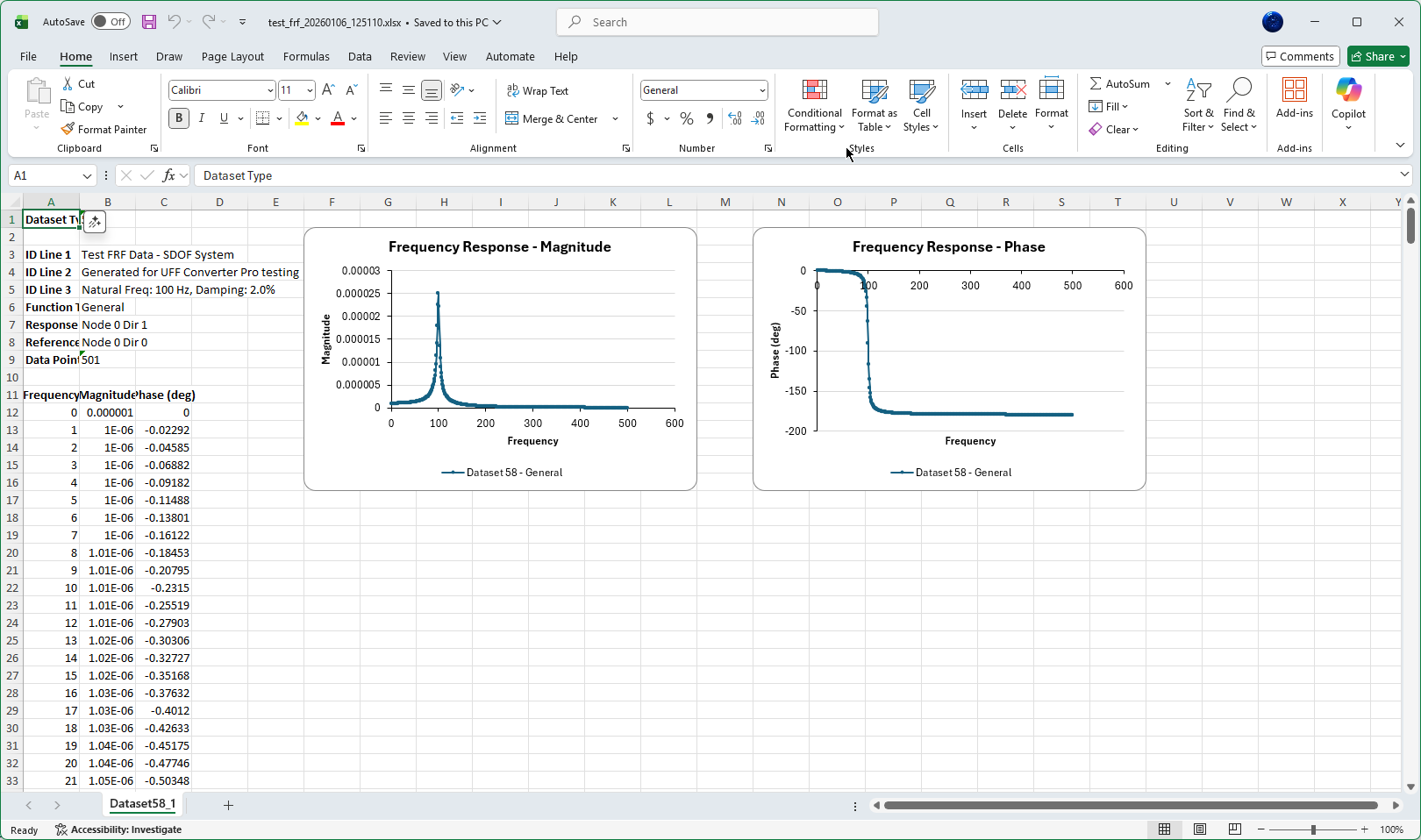
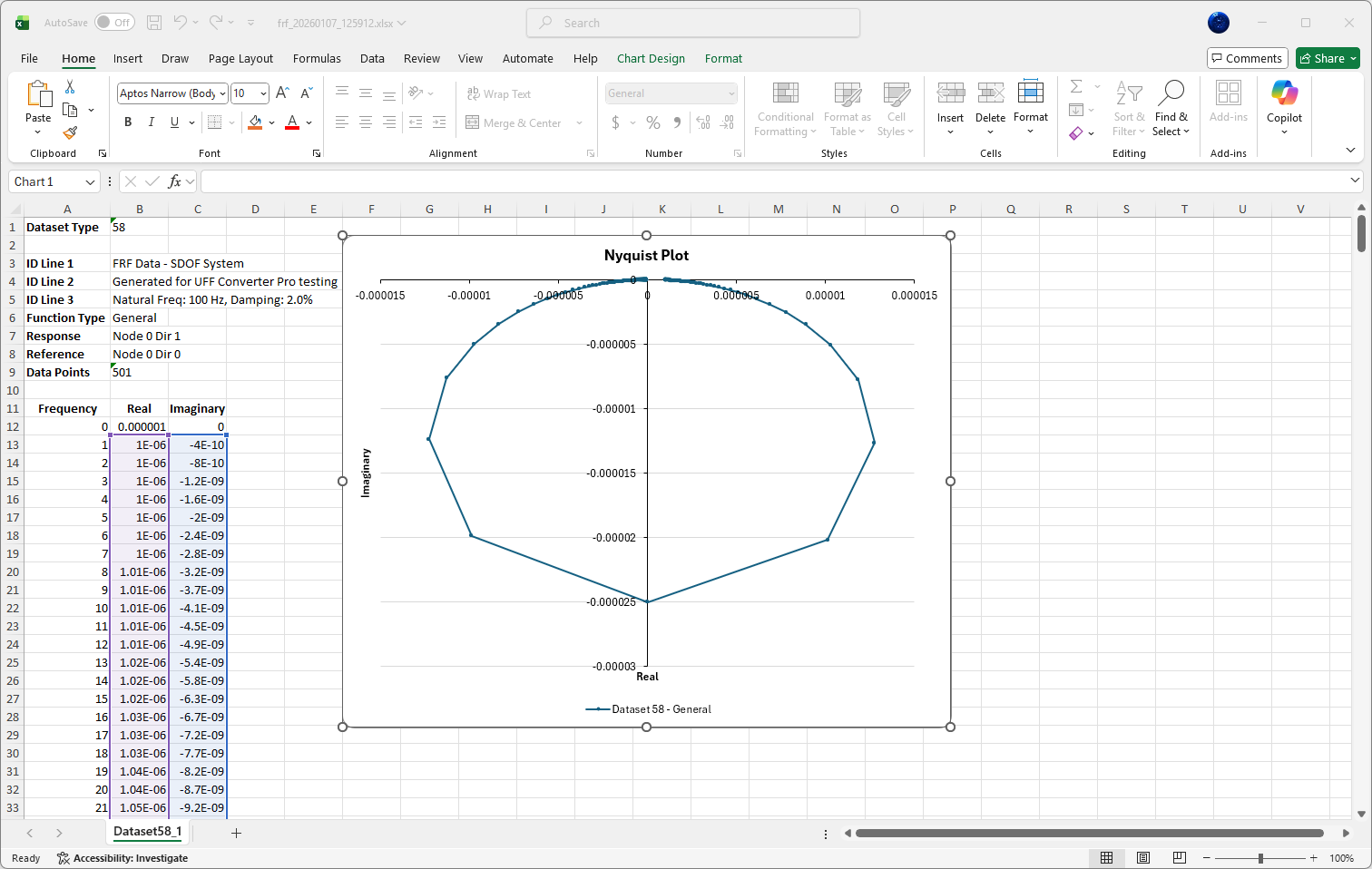
Built-in Charts for Dataset 58
Visualize frequency response data directly in your Excel output
Bode Plots
Magnitude vs Frequency and Phase vs Frequency charts automatically generated. Classic Bode plot visualization for frequency response analysis.
Nyquist Plots
Real vs Imaginary complex plane visualization. Perfect for stability analysis and system identification.
Handles Large Files with Ease
Streaming architecture designed for million+ row datasets
Streaming Excel Engine
Writes directly to disk without loading entire files in memory. Handle datasets with millions of rows.
Constant Memory Usage
Memory consumption stays flat regardless of file size. No more out-of-memory crashes on large datasets.
Real-time Progress
Track conversion progress with live updates. Cancel processing at any time if needed.
Streamlined Workflow
Convert files quickly with an intuitive, modern interface
Import Files
Drag and drop files or folders, or use the file picker. Select multiple files at once for batch processing.
Configure Options
Choose your export format, complex number representation, and phase units. Settings are remembered between sessions.
Convert
Click convert and watch the progress. Review the message log for any warnings or details about your data.
Modern User Interface
A clean, professional interface designed for engineering workflows
Dark Theme
Easy on the eyes during long analysis sessions. Professional look that fits your engineering environment.
Progress Tracking
Real-time progress bar shows conversion status. Know exactly how much work remains.
Message Log
Detailed logging of errors, warnings, and info messages. Troubleshoot data issues quickly.
Quick Reset
One click to clear all files and start fresh. No hunting through menus or dialogs.
100% Local Processing
Your proprietary test data never leaves your computer. All file processing happens entirely on your local machine - no cloud uploads, no external servers, no data transmission of any kind.
Built for Engineering Professionals
Trusted by engineers working with modal analysis and vibration data
Modal Analysis Data
Export FRF data from LMS, Simcenter, and similar modal analysis tools to Excel for reporting and further analysis.
Legacy Data Archives
Convert years of archived UFF test data to modern, accessible formats without needing the original acquisition software.
Data Sharing
Share FRF and vibration data with colleagues who don't have specialized analysis software. Everyone has Excel.
Custom Analysis
Extract vibration and acoustic test data for analysis in Python, MATLAB, R, or your preferred data science tools.
Quality Control
Batch convert measurement files for archiving and quality documentation. Built-in charts make reporting easy.
Simple, Fair Licensing
- 14-day free trial - Full functionality, no credit card required
- Annual subscription - Billed yearly, cancel anytime
- Free updates - All future updates included
- Hardware-locked license - Tied to your machine for security
- Offline activation - Works in air-gapped environments
Professional Edition
- All file format support
- Excel, CSV, and Raw CSV export
- Batch processing
- All configuration options
- Free updates while subscribed
- Email support
Technical Details
System Requirements
- Windows 10 version 1809 or later
- macOS version coming soon
- 64-bit processor
- 50 MB disk space
Installation
- Self-contained - no runtime dependencies
- Windows installer with optional desktop shortcut
- Automatic update notifications
- Clean uninstall
Technology
- Built on .NET MAUI
- Cross-platform architecture
- Native performance
- Modern codebase
Related Articles
Deep dives on UFF files, dataset structures, and conversion workflows
Understanding the UFF File Format
A practical guide to the Universal File Format for engineers — what's inside a UFF file, the most important dataset types (15, 55, 58, 58b, 164), ASCII vs binary, and the quirks that trip people up.
Read article →How to Convert UFF Files to Excel
Every method for getting UFF data into a spreadsheet — from manual text parsing to Python pyuff, MATLAB, VBA macros, and dedicated converter tools, with honest pros and cons for each.
Ready to Convert Your UFF Data?
Start your free 14-day trial today. No credit card required.